You already collect the data. Every session, you are marking trials, scoring accuracy, and noting how a client did against each goal. Collecting was never the hard part. The hard part is everything that comes after: turning a term’s worth of scattered numbers into something a parent can look at and actually understand, or something a payer will accept as proof that therapy is working.
That last stretch is where a lot of good clinical work quietly disappears. Parents nod politely at a page of percentages they cannot read. Reauthorization paperwork swallows an evening you did not have to spare. Progress that is obvious to you never quite lands with the people who most need to see it.
Closing that gap is the whole point of the progress tracking tools inside ReadySetConnect. Here is how it works, start to finish, from the data you capture in a session to a report you can hand a parent without translating a thing.
Step 1: Start with the data you are already capturing
Progress tracking begins inside the session, not after it. As you run a goal, whether that is an articulation target, a fine motor task, or a skill acquisition program, you record the result right there against that specific goal. Accuracy, number of trials, prompt level, a quick rating. There is nothing extra to remember. It is the same data you would scribble on a clipboard, just captured somewhere it can be put to use later.
Because every data point is tied to a defined goal, the system knows exactly what it is measuring. That sounds like a small thing. It is the part that makes everything after it work. Structured data going in is what lets a clean, readable report come back out.
Step 2: Watch the graph build itself
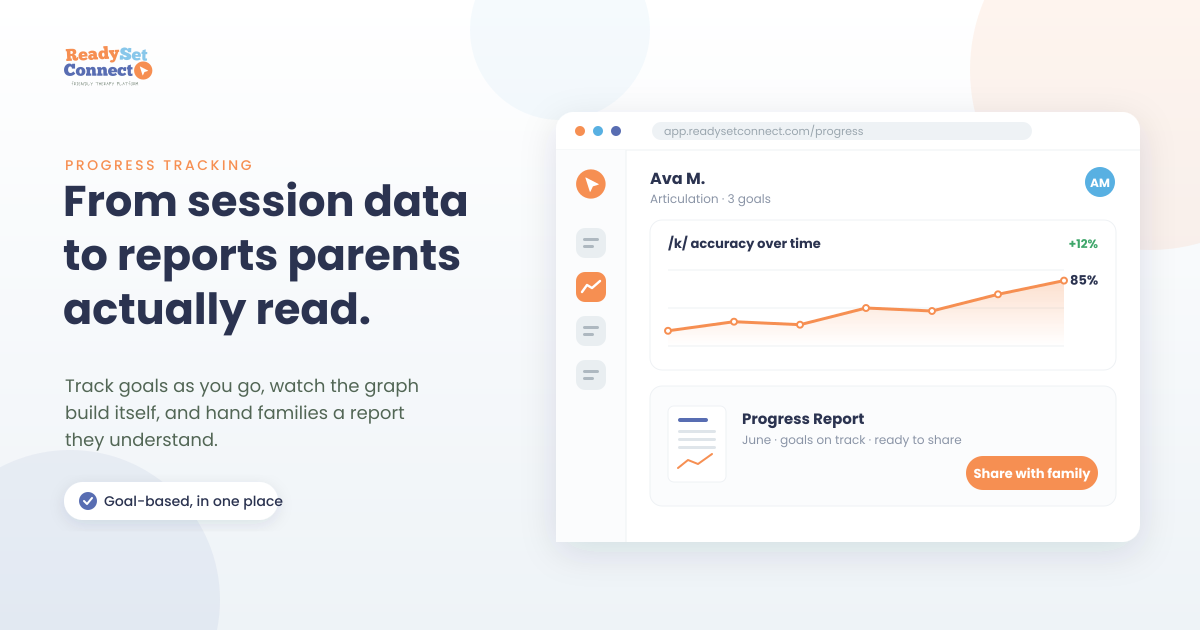
This is the step that hands you back your evening. Instead of dropping numbers into a spreadsheet and building a chart by hand, the progress on each goal plots itself as you go. Open a client and the trend line for every goal is already waiting: sessions along the bottom, performance up the side, the shape of the last two months in a single glance.
For you, that means catching a plateau early, while there is still time to adjust the plan before a review rather than after it. For the family, it means the story of their child’s progress is drawn before anyone sits down at the table.
Step 3: Generate a report anyone can read
When a progress update, a reauthorization, or a parent meeting comes around, the report pulls from that same tracked data. The goals, current performance, and the trend over time all come together as a clean summary written for someone who is not a clinician. Plain goal statements, simple visuals, and the numbers that matter, without the raw clutter that makes a data sheet unreadable to anyone outside the field.
You can share that summary with a family and keep the same goal-based record in your documentation for payers. One set of data, presented properly for two very different readers.

What it looks like across disciplines
The same flow bends to fit what you actually treat. Three quick examples:
- Speech-language pathology. A /k/ articulation goal tracked as percent accuracy across sessions shows a climb from 40% to 85%. That is a line a parent understands in a second, and a clean justification for continuing or stepping down services.
- Occupational therapy. A self-regulation or fine motor goal tracked by prompt level shows a child moving from maximal to minimal support. Suddenly, “less help needed over time” is something you can point to, not just something you sense.
- ABA and behavior services. A skill acquisition target tracked to mastery criteria shows acquisition and maintenance at a glance. It is the documentation funders expect, without rebuilding it by hand every authorization period.
Using the report in a parent meeting
A good report earns its keep in the room. Rather than walking a family through raw numbers, you put the trend line in front of them and let it do the talking. Here is the goal in plain words, here is where we started, here is where we are now. Parents follow a rising line far more easily than a column of figures, and that visual gives you a natural way into the part that actually changes outcomes, which is what to practise at home and why it matters.
It works the same way for the paperwork nobody enjoys. When reauthorization lands, the goal-based history is already assembled, so the case for continued services almost writes itself. This is the quiet advantage of a platform built by clinicians who have sat where you sit: the documentation a payer asks for and the story a parent wants to hear turn out to be the same data, shown two different ways.
Why parent-ready reports are worth the attention
Clear reports are not just tidier paperwork. When parents can see progress, they stay involved. They follow through on home practice, they keep their appointments, and they understand why the work continues. Clear, goal-based documentation also holds its ground when a payer asks you to justify services. And for the practice itself, the families who can see the value are the families who stay. Retention starts with people understanding what they are getting.
Frequently asked questions
Do I have to change how I take data during sessions?
No. You track the same goals and outcomes you already do. The only difference is that the data lands somewhere it can build graphs and reports on its own, instead of sitting on paper.
Can the same report work for both parents and payers?
Yes. The tracked data produces a plain-language summary a family can read and the goal-based record a payer looks for. It is one source of truth, presented for two audiences.
How is this different from keeping progress in a spreadsheet?
A spreadsheet holds numbers. It does not tie them to goals, chart them for you, or turn them into a report a parent understands. Progress tracking does all three automatically, so you spend your time reading the data rather than formatting it.
Does it work for a multi-disciplinary clinic?
Yes. Goals are defined per client and per discipline, so your SLPs, OTs, and ABA providers each track and report in the way that fits their work, all inside one system.
Will parents actually understand these reports?
That is the whole design goal. Reports use plain goal statements and simple visuals instead of clinical shorthand, so a parent can see progress at a glance without you translating every line.
Want to see it with your own goals? Book a short walkthrough and we will take progress tracking from session data to finished report together. Already using ReadySetConnect? Open a client and build a report from this week’s sessions. You can also compare the plans to see which tier fits your practice.